



Sriram Sanka

Databases | Cloud | Infrastructure | Security |

Archive for the ‘Anaconda’ Category

Python Basics – Part 1

Posted by Sriram Sanka on September 17, 2022

Language Introduction

Python is a dynamic, interpreted (bytecode-compiled) language. There are no type declarations of variables, parameters, functions, or methods in source code. This makes the code short and flexible, and you lose the compile-time type checking of the source code. Python tracks the types of all values at runtime and flags code that does not make sense as it runs.

https://www.edureka.co/blog/introduction-to-python/

In the Below Sections I have attached couple of reference Documents and Practice Notes for your reference. To obtain the contents, Rename the file Extension from txt to “ipynb” , which can be accessed using Jupyter Or Anaconda etc.

String Split

Description

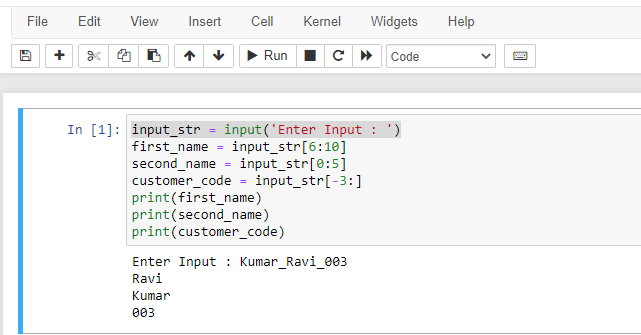
Split the string input_str = ‘Kumar_Ravi_003’ to the person’s second name, first name and unique customer code. In this example, second_name= ‘Kumar’, first_name= ‘Ravi’, customer_code = ‘003’.

input_str = input('data')
first_name = input_str[6:10]
second_name = input_str[0:5]
customer_code = input_str[-3:]
print(first_name)
print(second_name)
print(customer_code)
string -lstrip()
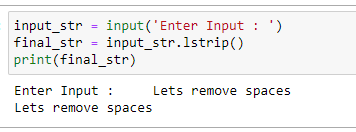
input_str = input('Enter Input : ')
final_str = input_str.lstrip()
print(final_str)

List is a collection which is ordered and changeable. Allows duplicate members.

Tuple is a collection which is ordered and unchangeable. Allows duplicate members.

Set is a collection which is unordered, unchangeable*, and unindexed. No duplicate members.

Dictionary is a collection which is ordered** and changeable. No duplicate members.

List to String

Description

Convert a list [‘Pythons syntax is easy to learn’, ‘Pythons syntax is very clear’] to a string using ‘&’. The sample output of this string will be:

Pythons syntax is easy to learn & Pythons syntax is very clear

Note that there is a space on both sides of ‘&’ (as usual in English sentences).
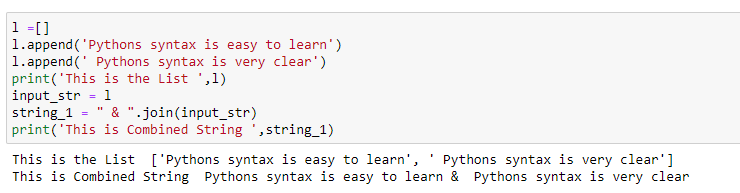
l =[]
l.append('Pythons syntax is easy to learn')
l.append(' Pythons syntax is very clear')
print('This is the List ',l)
input_str = l
string_1 = " & ".join(input_str)
print('This is Combined String ',string_1)

References

https://python-course.eu/advanced-python/lambda-filter-reduce-map.php

https://book.pythontips.com/en/latest/map_filter.html

https://python.swaroopch.com/functions.html

https://anh.cs.luc.edu/python/hands-on/3.1/handsonHtml/functions.html

https://treyhunner.com/2015/12/python-list-comprehensions-now-in-color/

https://python-3-patterns-idioms-test.readthedocs.io/en/latest/Comprehensions.html

https://docs.python.org/3/tutorial/controlflow.html

https://docs.python.org/3/reference/compound_stmts.html

https://docs.python.org/3/tutorial/datastructures.html

https://docs.python.org/3/tutorial/datastructures.html

https://jupyter-notebook-beginner-guide.readthedocs.io/en/latest/

https://jupyter-notebook-beginner-guide.readthedocs.io/en/latest/what_is_jupyter.html

https://python.swaroopch.com/

https://docs.python-guide.org/intro/learning/

https://www.simplilearn.com/tutorials/python-tutorial

https://developers.google.com/edu/python/lists

https://developers.google.com/edu/python/introduction

Posted in Anaconda, Python | Tagged: , , | Leave a Comment »

How to Install Python with Anaconda

Posted by Sriram Sanka on April 12, 2020

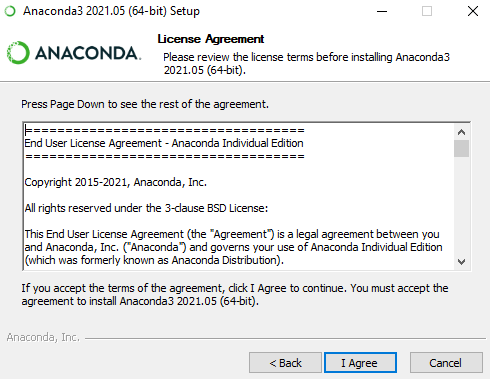
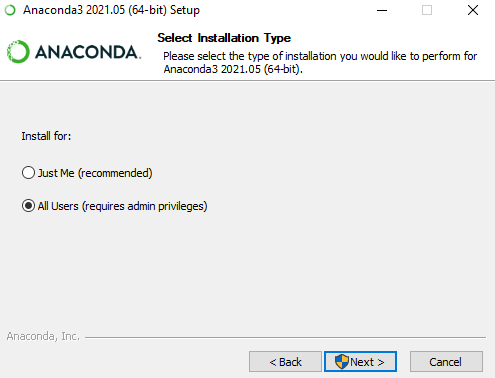
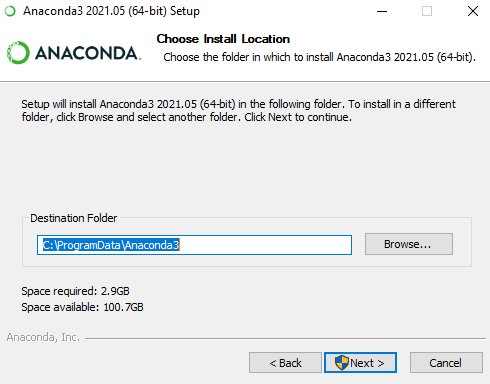
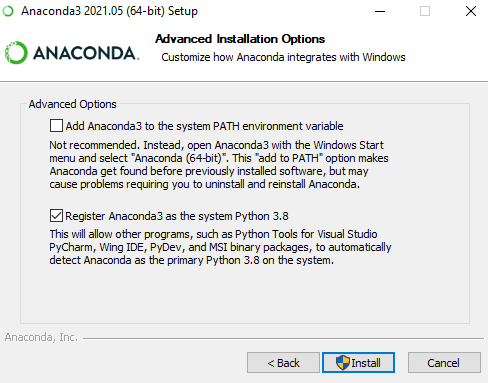
Refer to the document for help with installing Anaconda successfully Installing+Python.1

You can Download the individual version from https://www.anaconda.com/products/individual

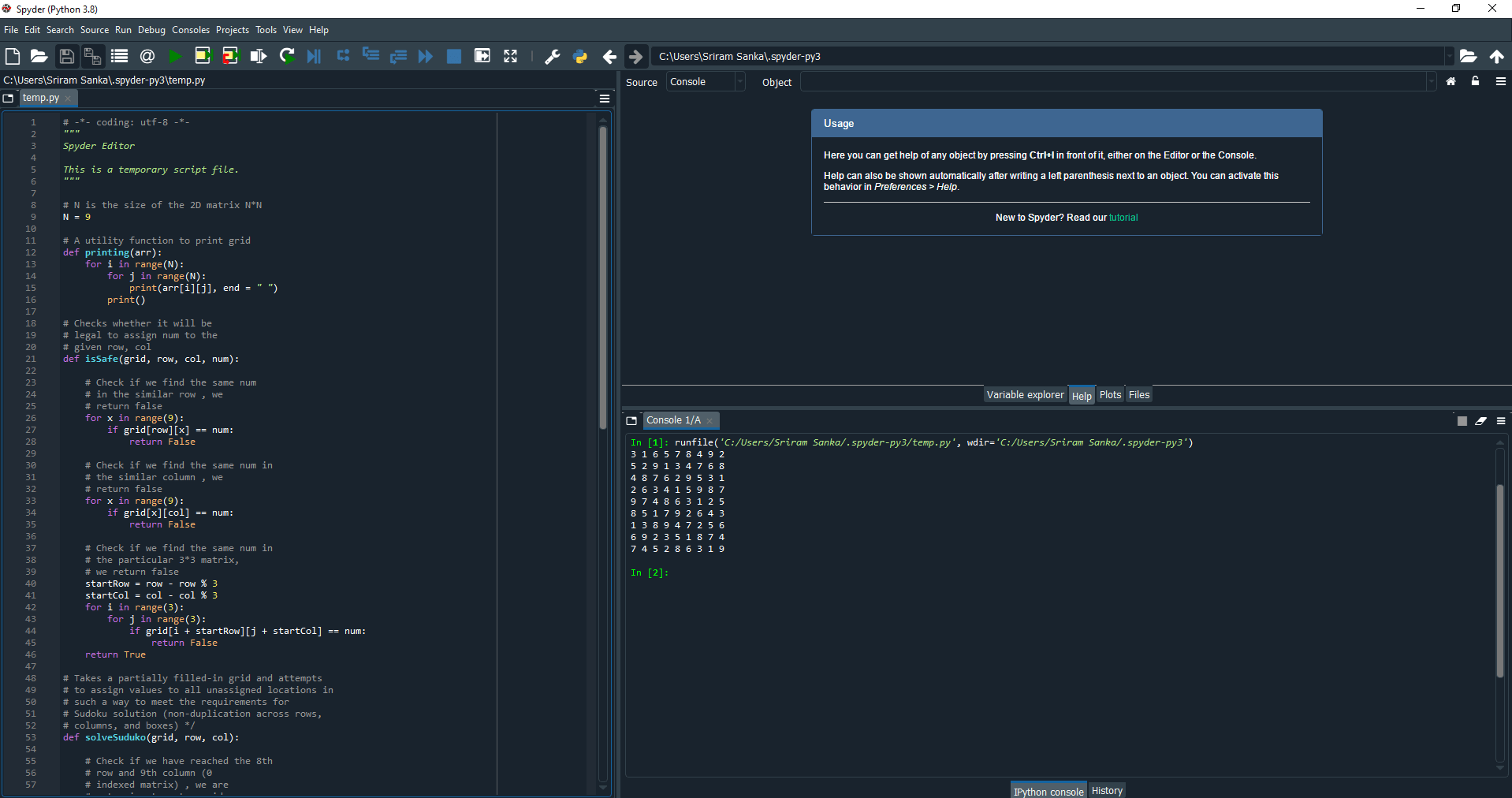
I prefer Spider for the Sample Code snippets.

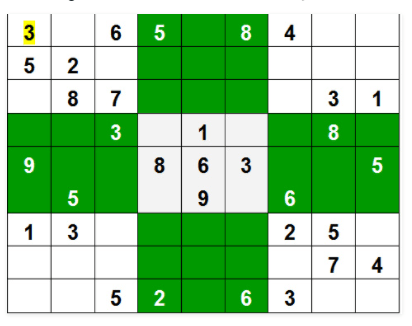
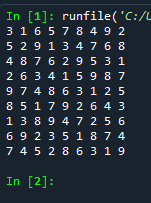
Sample Code for Sudoku Submitted at https://www.geeksforgeeks.org/sudoku-backtracking-7/

Input :

Output:

# N is the size of the 2D matrix   N*N
N = 9
 
# A utility function to print grid
def printing(arr):
    for i in range(N):
        for j in range(N):
            print(arr[i][j], end = " ")
        print()
 
# Checks whether it will be
# legal to assign num to the
# given row, col
def isSafe(grid, row, col, num):
   
    # Check if we find the same num
    # in the similar row , we
    # return false
    for x in range(9):
        if grid[row][x] == num:
            return False
 
    # Check if we find the same num in
    # the similar column , we
    # return false
    for x in range(9):
        if grid[x][col] == num:
            return False
 
    # Check if we find the same num in
    # the particular 3*3 matrix,
    # we return false
    startRow = row - row % 3
    startCol = col - col % 3
    for i in range(3):
        for j in range(3):
            if grid[i + startRow][j + startCol] == num:
                return False
    return True
 
# Takes a partially filled-in grid and attempts
# to assign values to all unassigned locations in
# such a way to meet the requirements for
# Sudoku solution (non-duplication across rows,
# columns, and boxes) */
def solveSuduko(grid, row, col):
   
    # Check if we have reached the 8th
    # row and 9th column (0
    # indexed matrix) , we are
    # returning true to avoid
    # further backtracking
    if (row == N - 1 and col == N):
        return True
       
    # Check if column value  becomes 9 ,
    # we move to next row and
    # column start from 0
    if col == N:
        row += 1
        col = 0
 
    # Check if the current position of
    # the grid already contains
    # value >0, we iterate for next column
    if grid[row][col] > 0:
        return solveSuduko(grid, row, col + 1)
    for num in range(1, N + 1, 1):
       
        # Check if it is safe to place
        # the num (1-9)  in the
        # given row ,col  ->we
        # move to next column
        if isSafe(grid, row, col, num):
           
            # Assigning the num in
            # the current (row,col)
            # position of the grid
            # and assuming our assined
            # num in the position
            # is correct
            grid[row][col] = num
 
            # Checking for next possibility with next
            # column
            if solveSuduko(grid, row, col + 1):
                return True
 
        # Removing the assigned num ,
        # since our assumption
        # was wrong , and we go for
        # next assumption with
        # diff num value
        grid[row][col] = 0
    return False
 
# Driver Code
 
# 0 means unassigned cells
grid = [[3, 0, 6, 5, 0, 8, 4, 0, 0],
        [5, 2, 0, 0, 0, 0, 0, 0, 0],
        [0, 8, 7, 0, 0, 0, 0, 3, 1],
        [0, 0, 3, 0, 1, 0, 0, 8, 0],
        [9, 0, 0, 8, 6, 3, 0, 0, 5],
        [0, 5, 0, 0, 9, 0, 6, 0, 0],
        [1, 3, 0, 0, 0, 0, 2, 5, 0],
        [0, 0, 0, 0, 0, 0, 0, 7, 4],
        [0, 0, 5, 2, 0, 6, 3, 0, 0]]
 
if (solveSuduko(grid, 0, 0)):
    printing(grid)
else:
    print("no solution  exists ")
 
    # This code is contributed by sudhanshgupta2019a

Posted in Anaconda, Books, Installation, Python | Tagged: , | Leave a Comment »