Not Just Databases

  • Enter your email address to follow this blog and receive notifications of new posts by email.

  • Total Views

    • 735,312 hits
  • $riram $anka

    Unknown's avatar
    The experiences, Test cases, views, and opinions etc expressed in this website are my own and does not reflect the views or opinions of my employer. This site is independent of and does not represent Oracle Corporation in any way. Oracle does not officially sponsor, approve, or endorse this site or its content.Product and company names mentioned in this website may be the trademarks of their respective owners.

ORA-27102: out of memory” While Creating a Database

Posted by Sriram Sanka on September 24, 2012


Today ,While Installing Oracle V 10g Using DBCA On a 32 bit Linux machine with 16 GB of RAM,(allocated 5GB as SGA ) We were encountered with this Error and unable to go further.

[oracle@db ~]$ oerr ORA 27102
27102, 00000, “out of memory”
// *Cause: Out of memory
// *Action: Consult the trace file for details
[oracle@db ~]$


This is Because of  On 32 Bit version,It cannot allocate more than 4 GB of Memory  to a process Directly.For this either we need to upgrade to 64 bit and start the Installation or decrease the Memory total value.

So we decreased the total memory size to 2.5 GB and It went successful without any issues.

Read Oracle Meta link Document ID 430492.1  to get  More Information on this.


Happy reading 😉


Posted in Oracle Server Administration | Tagged: | 7 Comments »

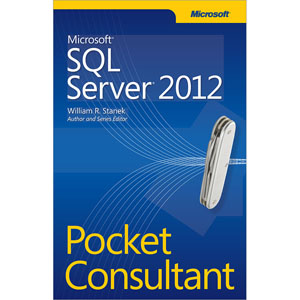
Microsoft__SQL_Server__2012_Pocket_Consultant By William R. Stanek

Posted by Sriram Sanka on May 8, 2012


Image

Well written and Well Organised  resource for DB Admins By William R. Stanek

 This Book really suits for 

  • Current SQL Server database administrators.
  • Accomplished users who have some administrator responsibilities.
  •  Administrators migrating to SQL Server 2012 from previous versions.
  •  Administrators transitioning from other database architectures.

I like the way author Presented the topics in a step-by-step manner and well categorized topics.

  •  Managing Your SQL Servers 
  •  Managing SQL Server Services and Clients 
  •  Implementing Policy-Based Management 
  •  Configuring and Tuning Your SQL Servers 
  •  Tuning and Linking Your SQL Servers 
  •  Database Administration Essentials
  •  Implementing SQL Server 2012 Security 
  •  Manipulating Schemas, Tables,and Views 
  •  Using Indexes, Constraints, and Partitions 
  •  Automating and Maintaining SQL Server 2012 
  •  SQL Server 2012 Backup and Recovery 
  •  SQL Server 2012 Profiling and Monitoring


Posted in Books | Leave a Comment »

SCN – What, why, and how?

Posted by Sriram Sanka on January 20, 2012


Here is a good article about SCN see the link below

SCN – What, why, and how?

Posted in Oracle Server Administration | Tagged: | Leave a Comment »

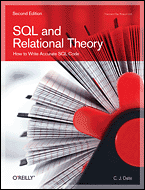
SQL and Relational Theory, 2nd Edition by C.J. Date

Posted by Sriram Sanka on January 19, 2012


C.J. Date, is an independent author, lecturer, researcher, and consultant, specializing in relational database technology. He is best known for his book An Introduction to Database Systems.This book does n`t deal with SQL statements .. But  is all about between SQL and the Relational concepts theory  in a mathematical way.How SQL departs from relational theory, the basic principles of relational theory etc…

This Book contains 12 Chapters .. you can find Exercises  at the end of each chapter.I like the Appendix section  of this Book.

Appendix A:  The Relational Model
Appendix B : SQL Departures from the Relational Model
Appendix C:  A Relational Approach to Missing Information
Appendix D:  A Tutorial D Grammar
Appendix E:  Summary of Recommendations
Appendix F: Answers to Exercises
Appendix G: Suggestions for Further Reading.
I recommend this book  for all  who  works with SQL.
you can find his books and videos @ http://www.oreillynet.com/pub/au/2136

Posted in Books | 1 Comment »

ORA-06544: PL/SQL: internal error, arguments: [ph2_cly out of bounds in PH2POP.], [0], [1240], [], [], [], [], []

Posted by Sriram Sanka on January 11, 2012


Recently we upgraded Our Development Database  from Oracle V10.2.0.1 to V10.2.0.5.
Today While I was  Compiling an Invalid procedure,

ORA-06544: PL/SQL: internal error, arguments: [ph2_cly out of
bounds in PH2POP.], [0], [1240], [], [], [], [], []
Encountered.

No clues available On “alert-log” file.
Verified with Oracle Support about it and found that its a Bug{Bug 10400244} on 10.2.0.5.
Oracle Meta-link Document [ID 1358114.1] Will give some clues about it.
Fixing errors other than this Internal error will resolved this issue.

Posted in Oracle Server Administration | Tagged: , , | 11 Comments »

Password Hash In Oracle 11g

Posted by Sriram Sanka on June 7, 2011


Let `s discuss about The Changes Of  DBA_USERS Especially In PASSWORD Column In Oracle 11g and 10g.

DBA_USERS   Gives Us Information about all users of the database.

And it contains password hash value In its PASSWORD Column

ind>  col TABLE_NAME format a10
ind> col COLUMN_NAME format a10
ind> col COMMENTS format a25
ind>  select TABLE_NAME,COLUMN_NAME, COMMENTS
  2   from dict_columns
  3   where TABLE_NAME='DBA_USERS' and COLUMN_NAME='PASSWORD';

TABLE_NAME COLUMN_NAM COMMENTS
---------- ---------- -------------------------
DBA_USERS  PASSWORD   Encrypted password

1 row selected.

Yes..It contains the encrypted value Based On Concatenation of Username and Password
This Is How/why two Users with same password can have different Encrypted hash values.

ind> create user satya identified by satya;

User created.

ind>  create user kalyani identified by satya;

User created.

ind> select username,password
  2  from dba_users
  3  where USERNAME in ('KALYANI','SATYA');

USERNAME                       PASSWORD
------------------------------ ------------------------------
KALYANI                        E81F7CB996A56BA9
SATYA                          218ED5615AAE5F6B

2 rows selected.

ind> drop user satya;

User dropped.

ind> drop user satyab;
drop user satyab
          *
ERROR at line 1:
ORA-01918: user 'SATYAB' does not exist

ind> create user satya identified by backpain;

User created.

ind> create user satyab identified by ackpain;

User created.

ind> select username,password
  2  from dba_users
  3  where username like 'SATYA%';

USERNAME                       PASSWORD
------------------------------ ------------------------------
SATYA                          458070F68E74206E
SATYAB                         458070F68E74206E

2 rows selected.

Here You can Observe that User SATYA and SATYAB with same hash value,
as the Concatenation of USERNAME and PASSWORD are Same.

But In Oracle 11g Oracle Wont store any password hash values in DBA_USERS.PASSWORD column.As Per the Document

http://download.oracle.com/docs/cd/E11882_01/server.112/e17110/statviews_5081.htm#REFRN23302

Password Column  is deprecated in favor of   the AUTHENTICATION_TYPE column

But You can get the password from “User$“.

SQL> create User a identified by "a";

User created.

SQL> create User b identified by "a";

User created.

SQL> select dbms_metadata.get_ddl('USER','A') from dual;

DBMS_METADATA.GET_DDL('USER','A')
--------------------------------------------------------------------------------

   CREATE USER "A" IDENTIFIED BY VALUES 'S:298EDEE1721E71B950D55CCB9ABA7EE5C596E
A6B0CCFF098E88889B98BD5;AFCC9478DFBF9029'
      DEFAULT TABLESPACE "USERS"
      TEMPORARY TABLESPACE "TEMP"

SQL> select dbms_metadata.get_ddl('USER','B') from dual;

DBMS_METADATA.GET_DDL('USER','B')
--------------------------------------------------------------------------------

   CREATE USER "B" IDENTIFIED BY VALUES 'S:25E85C1466288EE377681D131DF1920B33448
CD4108F8DDFC580A3315A39;9017AAA5BF2D9732'
      DEFAULT TABLESPACE "USERS"
      TEMPORARY TABLESPACE "TEMP"

SQL> select name, password, spare4 from sys.user$ where name ='A'
  2  ;

NAME                           PASSWORD
------------------------------ ------------------------------
SPARE4
--------------------------------------------------------------------------------
A                              AFCC9478DFBF9029
S:298EDEE1721E71B950D55CCB9ABA7EE5C596EA6B0CCFF098E88889B98BD5

SQL> select password,username from dba_users
  2  where length(username)=1;

PASSWORD                       USERNAME
------------------------------ ------------------------------
                               A
                               B

SQL>

You can Find My Post here at Orafaq.
http://www.orafaq.com/forum/mv/msg/171754/510127/136607/#msg_510127
For more reference
http://download.oracle.com/docs/cd/E11882_01/server.112/e17110/statviews_5081.htm#REFRN23302
Hope You enjoyed It 🙂
Sriram

Posted in Oracle Server Administration | 103 Comments »

ORA-00059: maximum number of DB_FILES exceeded

Posted by Sriram Sanka on May 27, 2011


This is all about the Relation B/W  MAXDATAFILES and DB_FILES In Oralce Database.

–This will Give Us db_files value. max no of data files that we can add.

select value from v$parameter where name = ‘db_files’;

This will give the MAXDATAFILES specified at Control file level while creating Database.

select records_total from v$controlfile_record_section where type = ‘DATAFILE’;

Lets Start with a small case. I have Created My database with DB_FILES   as 10.

C:\Windows\System32>sqlplus system/tejajun20

SQL*Plus: Release 11.2.0.1.0 Production on Fri May 27 20:20:19 2011

Copyright (c) 1982, 2010, Oracle.  All rights reserved.

Connected to:
Oracle Database 11g Enterprise Edition Release 11.2.0.1.0 - Production
With the Partitioning, OLAP, Data Mining and Real Application Testing options

SQL> select value from v$parameter where name = 'db_files';

VALUE
--------------------------------------------------------------------------------
10

SQL> select records_total from v$controlfile_record_section where type = 'DATAFILE';

RECORDS_TOTAL
-------------
          100

Let us have a look at the no of data files I have.

SQL> select file_name from dba_data_files;

FILE_NAME
--------------------------------------------------------------------------------
D:\APP1\SRIRAM\ORADATA\ORAFAQ\USERS01.DBF
D:\APP1\SRIRAM\ORADATA\ORAFAQ\UNDOTBS01.DBF
D:\APP1\SRIRAM\ORADATA\ORAFAQ\SYSAUX01.DBF
D:\APP1\SRIRAM\ORADATA\ORAFAQ\SYSTEM01.DBF
D:\APP1\SRIRAM\ORADATA\ORAFAQ\EXAMPLE01.DBF</pre>

Let me add some data files to users tables

SQL> alter tablespace users add datafile 'D:\APP1\SRIRAM\ORADATA\ORAFAQ\User2.dbf' size 100m ;

Tablespace altered.

SQL> alter tablespace users add datafile 'D:\APP1\SRIRAM\ORADATA\ORAFAQ\User3.dbf' size 100m ;

Tablespace altered.

SQL> alter tablespace users add datafile 'D:\APP1\SRIRAM\ORADATA\ORAFAQ\User4.dbf' size 100m ;

Tablespace altered.

SQL> select count(*) from v$datafile;

  COUNT(*)
----------
         8

SQL> alter tablespace users add datafile 'D:\APP1\SRIRAM\ORADATA\ORAFAQ\User5.dbf' size 100m ;

Tablespace altered.

SQL> alter tablespace users add datafile 'D:\APP1\SRIRAM\ORADATA\ORAFAQ\User6.dbf' size 100m ;

Tablespace altered.

SQL> select count(*) from v$datafile;

  COUNT(*)
----------
        10

SQL> select value from v$parameter where name = 'db_files';

VALUE
--------------------------------------------------------------------------------
10

SQL> select records_total from v$controlfile_record_section where type = 'DATAFILE';

RECORDS_TOTAL
-------------
          100

As I have already reached the max limit 10,Adding one more file will raise an Error.

SQL> alter tablespace users add datafile 'D:\APP1\SRIRAM\ORADATA\ORAFAQ\User7.dbf' size 100m ;
alter tablespace users add datafile 'D:\APP1\SRIRAM\ORADATA\ORAFAQ\User7.dbf' size 100m
*
ERROR at line 1:
ORA-00059: maximum number of DB_FILES exceeded

ORA-00059:

maximum number of DB_FILES exceeded
Cause: The value of the DB_FILES initialization parameter was exceeded.
Action: Increase the value of the DB_FILES parameter and warm start.

Lets Try to increase the value to a small number.

SQL> alter system set db_files=20 scope=spfile;

System altered.

SQL> conn sys as sysdba
Enter password:
Connected.
SQL> shutdown immediate
Database closed.
Database dismounted.
ORACLE instance shut down.
SQL> startup
ORACLE instance started.

Total System Global Area  401743872 bytes
Fixed Size                  1374892 bytes
Variable Size             268436820 bytes
Database Buffers          125829120 bytes
Redo Buffers                6103040 bytes
Database mounted.
Database opened.
SQL> select value from v$parameter where name = 'db_files';

VALUE
--------------------------------------------------------------------------------
20

SQL> select records_total from v$controlfile_record_section where type = 'DATAFILE';

RECORDS_TOTAL
-------------
          100

SQL> alter tablespace users add datafile 'D:\APP1\SRIRAM\ORADATA\ORAFAQ\User7.dbf' size 100m ;

Tablespace altered.

SQL>

See now it allowing us to add datafiles.what about Exceeding MAXDATAFILES? (i.e more than 100 data files).

Lets do that And verify what `ll happen.


SQL> alter system set db_files=150 scope=spfile;

System altered.

SQL> shutdown immediate
Database closed.
Database dismounted.
ORACLE instance shut down.
SQL> startup
ORACLE instance started.

Total System Global Area  401743872 bytes
Fixed Size                  1374892 bytes
Variable Size             268436820 bytes
Database Buffers          125829120 bytes
Redo Buffers                6103040 bytes
Database mounted.
Database opened.
SQL> select value from v$parameter where name = 'db_files';

VALUE
--------------------------------------------------------------------------------
150

SQL> select records_total from v$controlfile_record_section where type = 'DATAFILE';

RECORDS_TOTAL
-------------
          100

SQL> alter tablespace users add datafile 'D:\APP1\SRIRAM\ORADATA\ORAFAQ\User8.dbf' size 1m ;

Tablespace altered.

SQL> alter tablespace users add datafile 'D:\APP1\SRIRAM\ORADATA\ORAFAQ\User9.dbf' size 1m ;

Tablespace altered.

SQL> alter tablespace users add datafile 'D:\APP1\SRIRAM\ORADATA\ORAFAQ\User10.dbf' size 1m ;

Tablespace altered.

SQL> select count(*) from v$datafile;

  COUNT(*)
----------
        14
--- In another window I am adding datafiles upto the limit "100"
SQL> /

  COUNT(*)
----------
        48

SQL> /

  COUNT(*)
----------
        55

SQL> /

  COUNT(*)
----------
        82

SQL> /

  COUNT(*)
----------
        98

SQL> /

  COUNT(*)
----------
        98

SQL> /

  COUNT(*)
----------
        98

SQL> alter tablespace users add datafile 'D:\APP1\SRIRAM\ORADATA\ORAFAQ\User95.dbf' size 1m ;

Tablespace altered.

SQL> alter tablespace users add datafile 'D:\APP1\SRIRAM\ORADATA\ORAFAQ\User96.dbf' size 1m ;

Tablespace altered.

SQL>
SQL> select value from v$parameter where name = 'db_files';

VALUE
--------------------------------------------------------------------------------
150

SQL> select records_total from v$controlfile_record_section where type = 'DATAFILE';

RECORDS_TOTAL
-------------
          100

SQL> alter tablespace users add datafile 'D:\APP1\SRIRAM\ORADATA\ORAFAQ\User97.dbf' size 1m ;

Tablespace altered.

SQL> select value from v$parameter where name = 'db_files';

VALUE
--------------------------------------------------------------------------------
150

SQL> select records_total from v$controlfile_record_section where type = 'DATAFILE';

RECORDS_TOTAL
-------------
          200

----Observe it Automatically changed..

SQL>

As Per Oracle Documents :

Consider Possible Limitations When Adding Datafiles to a Tablespace:

  1. You can add datafiles to traditional smallfile tablespaces, subject to the following limitations:
  2. Operating systems often impose a limit on the number of files a process can open simultaneously. More datafiles cannot be created when the operating system limit of open files is reached.
  3. Operating systems impose limits on the number and size of datafiles.
  4. The database imposes a maximum limit on the number of datafiles for any Oracle Database opened by any instance. This limit is operating system specific.

You cannot exceed the number of datafiles specified by the DB_FILES initialization parameter.

When you issue CREATE DATABASE or CREATE CONTROLFILE statements, the MAXDATAFILES parameter specifies an initial size of the datafile portion of the control file. However,if you attempt to add a new file whose number is greater than MAXDATAFILES, but less than or equal to DB_FILES, the control file will expand automatically so that the datafiles section can accommodate more files.

DB_FILES specifies the maximum number of database files that can be opened for this database.The maximum valid value is the maximum number of files, subject to operating system constraint,that will ever be specified for the database, including files to be added by ADD DATAFILE statements.If you increase the value of DB_FILES, then you must shut down and restart all instances accessing the database before the new value can take effect. If you have a primary and standby database,then they should have the same value for this parameter.

For More Information Please Read:

http://download.oracle.com/docs/cd/B19306_01/server.102/b14231/dfiles.htm#sthref1343

http://download.oracle.com/docs/cd/B19306_01/server.102/b14231/dfiles.htm#sthref1343

Posted in Oracle Server Administration | 98 Comments »

Spell number In Indian Currency System Using Function (Number into words)

Posted by Sriram Sanka on May 20, 2011


As we all know We can convert number into words Using ‘Jsp’ format string in to_char function.

ind> select to_char(to_date(‘250′,’J’),’JSP’) from dual;

TO_CHAR(TO_DATE(‘
—————–
TWO HUNDRED FIFTY

1 row selected.

ind> select to_char(to_date(‘259′,’J’),’JSP’) from dual;

TO_CHAR(TO_DATE(‘259’,
———————-
TWO HUNDRED FIFTY-NINE

1 row selected.

ind> select to_char(to_date(‘9999′,’J’),’JSP’) from dual;

TO_CHAR(TO_DATE(‘9999′,’J’),’JSP’)
————————————–
NINE THOUSAND NINE HUNDRED NINETY-NINE

1 row selected.

But It has some limitations….See
ind> select to_char(to_date(‘250.25′,’J’),’JSP’) from dual;
select to_char(to_date(‘250.25′,’J’),’JSP’) from dual
*
ERROR at line 1:
ORA-01830: date format picture ends before converting entire input string

ind> select to_char(to_date(‘9999999999.99′,’J’),’JSP’) from dual;
select to_char(to_date(‘9999999999.99′,’J’),’JSP’) from dual
*
ERROR at line 1:
ORA-01854: julian date must be between 1 and 5373484

We can avoid this By creating one Function .
This is similar to Ask Tom Spell number

ind> select spell_number(‘9999999999.99’) from dual;

SPELL_NUMBER(‘9999999999.99’)
——————————————————————————–
nine billion nine hundred ninety-nine million nine hundred ninety-nine thousand
nine hundred ninety-nine

1 row selected.

ind> select into_rupees(‘9999999999.99’) from dual;

INTO_RUPEES(‘9999999999.99’)
——————————————————————————–
Nine Arab Ninety-Nine Crore Ninety-Nine Lakh Ninety-Nine Thousand Nine Hundred N
inety-Nine and Paise Ninety-Nine.

You can find this into_rupees script at Indian Rupees

Thank you 🙂

Posted in Functions In oracle | 7 Comments »

#1 Recovery from Loss of Non system datafile(In Archive log Mode)

Posted by Sriram Sanka on May 14, 2011


In  Order to Perform/Test this Scenario…..We should delete/Drop One Non system Datafile.

But This not possible to drop/Delete files when Database is Up and  running ……

“The process cannot access the file because it is being used by another process.”

here I `ll  copy/Replace User datafile with an Old datafile.

In shutdown mode I will manually  copy old file in using “cp” command,and try to Open DB.

C:\Windows\System32>sqlplus  sys as sysdba

SQL*Plus: Release 11.2.0.1.0 Production on Thu May 12 09:36:36 2011

Copyright (c) 1982, 2010, Oracle.  All rights reserved.

Enter password:

Connected to:
Oracle Database 11g Enterprise Edition Release 11.2.0.1.0 - Production
With the Partitioning, OLAP, Data Mining and Real Application Testing options

SQL> select count(*) from emp_cp;
select count(*) from emp_cp
                     *
ERROR at line 1:
ORA-01219: database not open: queries allowed on fixed tables/views only

SQL> alter database mount;
alter database mount
*
ERROR at line 1:
ORA-01100: database already mounted

SQL> alter database open;
alter database open
*
ERROR at line 1:
ORA-01190: control file or data file 4 is from before the last RESETLOGS
ORA-01110: data file 4: 'D:\APP1\SRIRAM\ORADATA\SRIHARSHA\USERS01.DBF'

SQL> select * from v$recover_file;

     FILE# ONLINE  ONLINE_
---------- ------- -------
ERROR                                                                CHANGE#
----------------------------------------------------------------- ----------
TIME
---------
         4 ONLINE  ONLINE
UNKNOWN ERROR                                                         996306
12-MAY-11

SQL> alter database datafile 4 offline;

Database altered.

SQL> alter database recover automatic datafile 4;

Database altered.

SQL> alter database datafile 4 online;

Database altered.

SQL> alter database open;

Database altered.

SQL> select count(*) from scott.emp_cp;

  COUNT(*)
----------
       112

SQL> select * from v$recover_file;

no rows selected

SQL>

If archive log not enabled the you may receive 

SQL> alter database datafile 4 offline;
alter database datafile 4 offline
*
ERROR at line 1:
ORA-01145: offline immediate disallowed unless media recovery enabled

🙂

Posted in Nothing But BackUp | 8 Comments »

How to read Oracle Explain Plan

Posted by Sriram Sanka on May 10, 2011


The EXPLAIN PLAN statement displays execution plans chosen by the Oracle optimizer.A statement’s execution plan is the sequence of operations Oracle performs to run the statement.execution plans are read inside-out.if there are two statements at the same level, the first statement is executed first.

You can use “Explain plan statement for this.” which should be explained first.
The basic syntax to get explain plan is explain plan set statement_id= for

For Ex:
ind> explain plan set statement_id=’ORAFAQ’ for
2 select
3 a.empno,
4 a.ename,
5 b.dname
6 from
7 emp_sriram a,
8 dept b
9 where
10 a.deptno=b.deptno
11 /

Explained.
Now the sequential steps of this sql statement is stored in a Table called PLAN_TABLE.

Lets have a look at the table.

ind> select LPad(‘ ‘, 2*(Level-1)) || Level || ‘.’ || Nvl(Position,0)|| ‘ ‘ ||
2 Operation || ‘ ‘ || Options || ‘ ‘ || Object_Name || ‘ ‘ || Object_Type
3 || ‘ ‘ || Decode(id, 0, Statement_Id ||’ Cost = ‘ || Position) || cost
4 || ‘ ‘ || Object_Node “Query Plan”
5 from plan_table
6 start with id = 0 And statement_id=’ORAFAQ’
7 connect by prior id = parent_id
8 and statement_id=’ORAFAQ’
9 /

Query Plan
———————————————————————————————–
1.4 SELECT STATEMENT ORAFAQ Cost = 44
2.1 NESTED LOOPS 4
3.1 TABLE ACCESS FULL EMP_SRIRAM TABLE 3
3.2 TABLE ACCESS BY INDEX ROWID DEPT TABLE 1
4.1 INDEX UNIQUE SCAN PK_DEPT INDEX (UNIQUE) 0

5 rows selected.

You can Also Use DBMS_XPLAN.DISPLAY.
ind> SELECT *
2 FROM TABLE(DBMS_XPLAN.DISPLAY(‘PLAN_TABLE’,’ORAFAQ’,’BASIC’));

PLAN_TABLE_OUTPUT
———————————————————————————-
Plan hash value: 2868360194

—————————————————
| Id | Operation | Name |
—————————————————
| 0 | SELECT STATEMENT | |
| 1 | NESTED LOOPS | |
| 2 | TABLE ACCESS FULL | EMP_SRIRAM |
| 3 | TABLE ACCESS BY INDEX ROWID| DEPT |
| 4 | INDEX UNIQUE SCAN | PK_DEPT |
—————————————————

11 rows selected.

The basic structure of this package is
dbms_xplan.display(
table_name IN VARCHAR2 DEFAULT ‘PLAN_TABLE’,
statement_id IN VARCHAR2 DEFAULT NULL,
format IN VARCHAR2 DEFAULT ‘TYPICAL’);

Format choices are
BASIC ….. displays minimum information
TYPICAL … displays most relevant information
SERIAL …. like TYPICAL but without parallel information
ALL ……. displays all information

SQL plus autotrace also produce the explain  plan …..

set autotrace off
set autotrace on
set autotrace traceonly

set autotrace on explain
set autotrace on statistics
set autotrace on explain statistics

set autotrace traceonly explain
set autotrace traceonly statistics
set autotrace traceonly explain statistics

set autotrace off explain
set autotrace off statistics
set autotrace off explain statistics
Setting autotrace allows to display some statistics and/or an query execution plan for DML statements.
set autotrace on:	Shows the execution plan as well as statistics of the statement.
set autotrace on explain:	Displays the execution plan only.
set autotrace on statistics:	Displays the statistics only.
set autotrace traceonly:	Displays the execution plan and the statistics (as set autotrace on does), but doesn't print a query's result.
set autotrace off:	Disables all autotrace

Now lets have a look at execution plan order ….

ind> select LPAD(‘ ‘,2*(LEVEL-1))||operation “OPERATION”, options “OPTIONS”,
2 DECODE(TO_CHAR(id),’0’,’COST = ‘ || NVL(TO_CHAR(position),’n/a’),
3 object_name) “OBJECTNAME”, id ||’-‘|| NVL(parent_id, 0)||’-‘||
4 NVL(position, 0) “ORDER”, SUBSTR(optimizer,1,6) “OPT”
5 from plan_table
6 start with id = 0
7 and statement_id=’ORAFAQ’
8 connect by prior id = parent_id
9 and statement_id=’ORAFAQ’;

OPERATION OPTIONS OBJECTNAME ORDER OPT
—————————— —————————— —————————— ——-
SELECT STATEMENT COST = 4 0-0-4 ALL_RO
NESTED LOOPS 1-0-1
TABLE ACCESS FULL EMP_SRIRAM 2-1-1 ANALYZ
TABLE ACCESS BY INDEX ROWID DEPT 3-1-2 ANALYZ
INDEX UNIQUE SCAN PK_DEPT 4-3-1 ANALYZ

5 rows selected.

ind> select LPAD(‘ ‘,2*(LEVEL-1))||operation “OPERATION”, options “OPTIONS”,

2 DECODE(TO_CHAR(id),’0’,’COST = ‘ || NVL(TO_CHAR(position),’n/a’),

3 object_name) “OBJECTNAME”, id ||’-‘|| NVL(parent_id, 0)||’-‘||

4 NVL(position, 0) “ORDER”

5 from plan_table

6 start with id = 0

7 and statement_id=’ORAFAQ’

8 connect by prior id = parent_id

9 and statement_id=’ORAFAQ’;

OPERATION OPTIONS OBJECTNAME ORDER

—————————— —————————— —————————— ——-

SELECT STATEMENT COST = 4                      0-0-4

NESTED LOOPS                                                      1-0-1

TABLE ACCESS FULL EMP_SRIRAM             2-1-1

TABLE ACCESS BY INDEX ROWID DEPT      3-1-2

INDEX UNIQUE SCAN PK_DEPT                        4-3-1

5 rows selected.

On  0-0-4  it is in an order like ID and parent id nad its position.

Like wise if we can order them

00
10
21
31
43
here Level 1 has 2 childs(2,3) and  3 has 1 child(4).
So the execution steps sequential order will be 2,4,3,1
i.e
TABLE ACCESS               FULL                           EMP_SRIRAM  
INDEX                    UNIQUE SCAN                    PK_DEPT
TABLE ACCESS               BY INDEX ROWID                 DEPT  
Produce the result
SELECT STATEMENT Indicates that its a "SELECT STATEMENT"
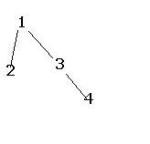
Here First it will read data from emp_sriram then a unique Index scan  on dept (step 4) 
which gives the rowids and based the rowid input it goes to the step 1
(we can say for understanding) and produce the result.

For More Information Please have a look at Oracle documents.

Posted in Oracle Server Administration | 2 Comments »

 
Tales From A Lazy Fat DBA

Its all about Databases, their performance, troubleshooting & much more .... ¯\_(ツ)_/¯

Thinking Out Loud

Michael T. Dinh, Oracle DBA

Notes On Oracle

by Mehmet Eser

Oracle Diagnostician

Performance troubleshooting as exact science

deveshdba

get sum oracle stuffs

Data Warehousing with Oracle

Dani Schnider's Blog

ORASteps

Oracle DBA's Daily Work

DBAspaceblog.com

Welcome everyone!! The idea of this blog is to help the DBA in their daily tasks. Enjoy.

Anand's Data Stories

Learn. Share. Repeat.

Tanel Poder's blog: Core IT for geeks and pros

Oracle Performance Tuning, Troubleshooting, Internals

Yet Another OCM

Journey as an Oracle Certified Master

Neil Chandler's DB Blog

A resource for Database Professionals

DBA Kevlar

Tips, tricks, (and maybe a few rants) so more DBA's become bulletproof!

OraExpert Academy

Consulting and Training