


set linesize 100
set pagesize 100
SELECT * FROM
(SELECT substr(sql_text,1,40) sql,
        buffer_gets, executions, buffer_gets/executions "Gets/Exec",
        hash_value,address
   FROM V$SQLAREA
  WHERE buffer_gets > 10000
 ORDER BY buffer_gets DESC)
WHERE rownum <=10
;
Query for Top 10 by Buffer Gets:
Posted by Sriram Sanka on September 12, 2022
Posted in Buffer Gets, sql | Tagged: Buffer Gets, oracle tuning, sql | Leave a Comment »
Solving Sudoku Using SQL – By Anton Scheffer
Posted by Sriram Sanka on September 12, 2022
Here is an Excellent piece of code that Gets the Sudoku Resolved.
with x( s, ind ) as
( select sud, instr( sud, ' ' )
  from ( select '&' sud from dual )
  union all
  select substr( s, 1, ind - 1 ) || z || substr( s, ind + 1 )
       , instr( s, ' ', ind + 1 )
  from x
     , ( select to_char( rownum ) z
         from dual
         connect by rownum <= 9
       ) z
  where ind > 0
  and not exists ( select null
                   from ( select rownum lp
                          from dual
                          connect by rownum <= 9
                        )
                   where z = substr( s, trunc( ( ind - 1 ) / 9 ) * 9 + lp, 1 )
                   or    z = substr( s, mod( ind - 1, 9 ) - 8 + lp * 9, 1 )
                   or    z = substr( s, mod( trunc( ( ind - 1 ) / 3 ), 3 ) * 3
                                      + trunc( ( ind - 1 ) / 27 ) * 27 + lp
                                      + trunc( ( lp - 1 ) / 3 ) * 6
                                   , 1 )
                 )
)
select line_wrap(s,9)
from x
where ind = 0
/

Posted in Functions In oracle, sql, SUDOKU | Tagged: oracle, sql, SUDOKU | Leave a Comment »
Date Difference(datediff) Using Oracle SQL – By Thomas Kyte(ASKTOM)
Posted by Sriram Sanka on September 11, 2022
Its an Old Good Script from my Script Collection to find the number of minutes/Seconds/Hours between two dates- Original Author – TomKyte.

create or replace function datediff( p_what in varchar2,
                                       p_d1   in date,
                                         p_d2   in date ) return number
    as
        l_result    number;
    begin
        select (p_d2-p_d1) *
               decode( upper(p_what),
                       'SS', 24*60*60, 'MI', 24*60, 'HH', 24, NULL )
        into l_result from dual;

       return l_result;
   end;
   /
WITH data
     AS (SELECT To_date(SYSDATE - 2, 'dd-mon-yyyy hh24:mi:ss') d1,
                To_date(SYSDATE, 'dd-mon-yyyy hh24:mi:ss')     d2
         FROM   dual)
SELECT Datediff('ss', d1, d2) AS seconds,
       Datediff('mi', d1, d2) AS minutes,
       Datediff('hh', d1, d2) hours
FROM   data
SQL> WITH data
  2       AS (SELECT To_date(SYSDATE - 2, 'dd-mon-yyyy hh24:mi:ss') d1,
  3                  To_date(SYSDATE, 'dd-mon-yyyy hh24:mi:ss')     d2
  4           FROM   dual)
  5  SELECT Datediff('ss', d1, d2) AS seconds,
  6         Datediff('mi', d1, d2) AS minutes,
  7         Datediff('hh', d1, d2) hours
  8  FROM   data ;

   SECONDS    MINUTES      HOURS
---------- ---------- ----------
    172800       2880         48

SQL>
Posted in Functions In oracle, Uncategorized | Tagged: datediff, function, oracle, sql | Leave a Comment »
Install Python Modules using PIP & Upgrading Pip Version
Posted by Sriram Sanka on June 19, 2022
You can Install Python Modules by running Pip command as follows
python -m pip install matplotlib

python.exe -m pip install --upgrade pip This will upgrade the Pip Version to the Latest.
Posted in Python | Tagged: Matplotlib, PIP, Python | Leave a Comment »
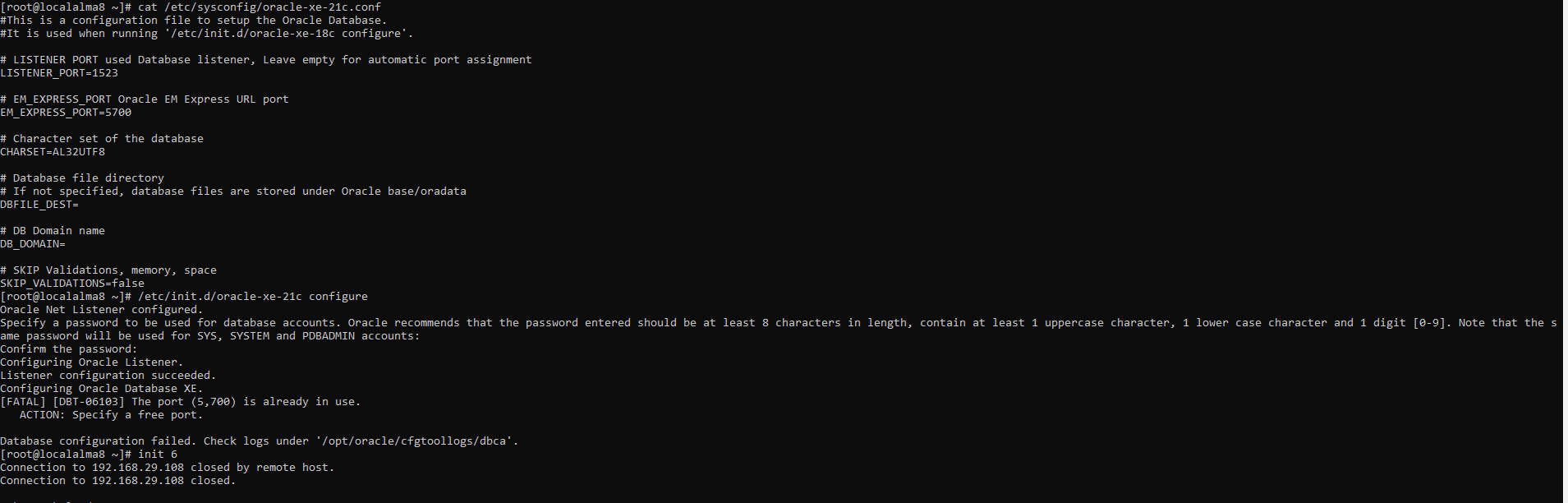
[FATAL] [DBT-06103] The port (5,500) is already in use.
Posted by Sriram Sanka on May 12, 2022
If you get this Port already in use Error While Installing Oracle in Linux., Make sure to have Proper Host Name Configured and Entry in /etc/hosts file.
Posted in Uncategorized | Leave a Comment »
Few More Additions to the List
Posted by Sriram Sanka on December 27, 2021


Posted in Uncategorized | Leave a Comment »
Log4j Zero-Day RCE (CVE-2021-44228) Vulnerability
Posted by Sriram Sanka on December 11, 2021
I came to know about this Critical Vulnerability last night, and below is actual info same as the original content/Post by REDHAT https://access.redhat.com/security/cve/cve-2021-44228, Posting this as it is as I thought Its more clear in their Page on their words.
Description
A flaw was found in the Java logging library Apache Log4j 2 in versions from 2.0-beta9 and before and including 2.14.1. This could allow a remote attacker to execute code on the server if the system logs an attacker-controlled string value with the attacker’s JNDI LDAP server lookup.
Statement
This issue only affects log4j versions between 2.0 and 2.14.1. In order to exploit this flaw you need:
- A remotely accessible endpoint with any protocol (HTTP, TCP, etc) that allows an attacker to send arbitrary data,
- A log statement in the endpoint that logs the attacker controlled data.
Due to the existence of JMS Appender which can use JNDI in the log4j 1.x, it is possible that log4j version 1.x is also affected by this vulnerability. The impact is still under investigation.
Mitigation
There are two possible mitigations for this flaw in versions from 2.10 to 2.14.1:
– Set the system property log4j2.formatMsgNoLookups to true, or
– Remove the JndiLookup class from the classpath. For example: zip -q -d log4j-core-*.jar org/apache/logging/log4j/core/lookup/JndiLookup.class`
Possible Workaround :
In order to mitigate vulnerabilities, users should switch log4j2.formatMsgNoLookups to true by adding:”‐Dlog4j2.formatMsgNoLookups=True” to the JVM command for starting the application.
Latest log4j API can be downloadable from https://logging.apache.org/log4j/2.x/download.html
Source :
https://access.redhat.com/security/cve/cve-2021-44228
Posted in Security | Leave a Comment »
MySQL Load Data Statement – Performance
Posted by Sriram Sanka on December 10, 2021
As mentioned in the MySQL Documentation here https://dev.mysql.com/doc/refman/8.0/en/load-data.html ,
The
LOAD DATAstatement reads rows from a text file into a table at a very high speed. The file can be read from the server host or the client host, depending on whether theLOCALmodifier is given.LOCALalso affects data interpretation and error handling.
Lets Run a Quick Test !
Loading Data Into a Table in the local Database using MySQL workbench Executed around 35Min (2098.781 Sec) for 35K records.

Now Lets Truncate the Table and re-load the data using LOAD DATA Statement

BOOM ! Job Done within 2 Sec.
Posted in LoadTest, MySql, Performance | Leave a Comment »
Error using MySQL Workbench – unhandled exception list index out of range.
Posted by Sriram Sanka on December 10, 2021
While Loading the data using MySQL Workbench, you may hit the error unhandled exception list index out of range

There are no clues in the workbench log files, in such cases you can load the Data Using MySQL LOAD DATA Statement . Which will load the data very fast and without errors.
mysql> LOAD DATA LOCAL INFILE "C:/\Patient.csv"
-> INTO TABLE xxhc_patient
-> FIELDS TERMINATED BY ','
-> ENCLOSED BY '"'
-> LINES TERMINATED BY '\n'
-> IGNORE 1 ROWS;
Query OK, 58 rows affected, 232 warnings (0.04 sec)
Records: 58 Deleted: 0 Skipped: 0 Warnings: 232
In case if you get the following errors , run the below commands and re-execute load data statements.
ERROR: Loading local data is disabled - this must be enabled on both the client and server sides
ERROR 2068 (HY000): LOAD DATA LOCAL INFILE file request rejected due to restrictions on access.
mysql> SET GLOBAL local_infile=1;
mysql --local_infile=1 -u<username> -p<Password> DB_NAME
Posted in MySql | Leave a Comment »
 Not Just Databases