The experiences, Test cases, views, and opinions etc expressed in this website are my own and does not reflect the views or opinions of my employer. This site is independent of and does not represent Oracle Corporation in any way. Oracle does not officially sponsor, approve, or endorse this site or its content.Product and company names mentioned in this website may be the trademarks of their respective owners.
Error while changing the IP Address in EC2 Security Groups. This happened ,as the user does not have access to change the IP in SG Group 2,after adding the below rule (Underlined Part) resolved this error.
Script to generate Kill Locked Sessions in Oracle :
In case of RDS ,
SELECT 'exec rdsadmin.rdsadmin_util.kill('||s.sid ||','|| s.serial# ||' );'
FROM v$session s ,
v$process p ,
v$lock l ,
dba_objects o
WHERE
s.paddr = p.addr
AND l.sid = s.sid
AND l.id1 = o.object_id
AND s.username = 'XXAPPS' --- Change as needed.
AND object_name like ('XXSC%'); --- Change as needed.
When you try to Open R12 Form template fmb files in Oracle forms, you may receive FRM-10102: Cannot attach PL/SQL library APPCORE .
Unable to open Template.fmb. Getting following error
FRM-10102: Cannot attach PL/SQL library APPCORE. This library attachment will be lost if the module is saved. FRM-10102: Cannot attach PL/SQL library APPDAYPK. This library attachment will be lost if the module is saved. FRM-10102: Cannot attach PL/SQL library GLOBE. This library attachment will be lost if the module is saved. FRM-10102: Cannot attach PL/SQL library FNDSQF. This library attachment will be lost if the module is saved. FRM-10102: Cannot attach PL/SQL library JA. This library attachment will be lost if the module is saved. FRM-10102: Cannot attach PL/SQL library JE. This library attachment will be lost if the module is saved. FRM-10102: Cannot attach PL/SQL library JL. This library attachment will be lost if the module is saved. FRM-10102: Cannot attach PL/SQL library VERT. This library attachment will be lost if the module is saved. FRM-10102: Cannot attach PL/SQL library GHR. This library attachment will be lost if the module is saved. FRM-10102: Cannot attach PL/SQL library PQH_GEN. This library attachment will be lost if the module is saved. FRM-10102: Cannot attach PL/SQL library PSAC. This library attachment will be lost if the module is saved.
Solution : Set the Path for FORMS_PATH with the location of all core libraries(pll files).
# N is the size of the 2D matrix   N*N
N = 9

# A utility function to print grid
def printing(arr):
    for i in range(N):
        for j in range(N):
            print(arr[i][j], end = " ")
        print()

# Checks whether it will be
# legal to assign num to the
# given row, col
def isSafe(grid, row, col, num):

    # Check if we find the same num
    # in the similar row , we
    # return false
    for x in range(9):
        if grid[row][x] == num:
            return False

    # Check if we find the same num in
    # the similar column , we
    # return false
    for x in range(9):
        if grid[x][col] == num:
            return False

    # Check if we find the same num in
    # the particular 3*3 matrix,
    # we return false
    startRow = row - row % 3
    startCol = col - col % 3
    for i in range(3):
        for j in range(3):
            if grid[i + startRow][j + startCol] == num:
                return False
    return True

# Takes a partially filled-in grid and attempts
# to assign values to all unassigned locations in
# such a way to meet the requirements for
# Sudoku solution (non-duplication across rows,
# columns, and boxes) */
def solveSuduko(grid, row, col):

    # Check if we have reached the 8th
    # row and 9th column (0
    # indexed matrix) , we are
    # returning true to avoid
    # further backtracking
    if (row == N - 1 and col == N):
        return True

    # Check if column value  becomes 9 ,
    # we move to next row and
    # column start from 0
    if col == N:
        row += 1
        col = 0

    # Check if the current position of
    # the grid already contains
    # value >0, we iterate for next column
    if grid[row][col] > 0:
        return solveSuduko(grid, row, col + 1)
    for num in range(1, N + 1, 1):

        # Check if it is safe to place
        # the num (1-9)  in the
        # given row ,col  ->we
        # move to next column
        if isSafe(grid, row, col, num):

            # Assigning the num in
            # the current (row,col)
            # position of the grid
            # and assuming our assined
            # num in the position
            # is correct
            grid[row][col] = num

            # Checking for next possibility with next
            # column
            if solveSuduko(grid, row, col + 1):
                return True

        # Removing the assigned num ,
        # since our assumption
        # was wrong , and we go for
        # next assumption with
        # diff num value
        grid[row][col] = 0
    return False

# Driver Code

# 0 means unassigned cells
grid = [[3, 0, 6, 5, 0, 8, 4, 0, 0],
        [5, 2, 0, 0, 0, 0, 0, 0, 0],
        [0, 8, 7, 0, 0, 0, 0, 3, 1],
        [0, 0, 3, 0, 1, 0, 0, 8, 0],
        [9, 0, 0, 8, 6, 3, 0, 0, 5],
        [0, 5, 0, 0, 9, 0, 6, 0, 0],
        [1, 3, 0, 0, 0, 0, 2, 5, 0],
        [0, 0, 0, 0, 0, 0, 0, 7, 4],
        [0, 0, 5, 2, 0, 6, 3, 0, 0]]

if (solveSuduko(grid, 0, 0)):
    printing(grid)
else:
    print("no solution  exists ")

    # This code is contributed by sudhanshgupta2019a
Swap space in Linux is used when the amount of physical memory (RAM) is full. If the system needs more memory resources and the RAM is full, inactive pages in memory are moved to the swap space.
Swap space can be a dedicated swap partition (recommended), a swap file, or a combination of swap partitions and swap files.
We can Create Swap file and make use of it as described below .
Step 1: Create a file with required size
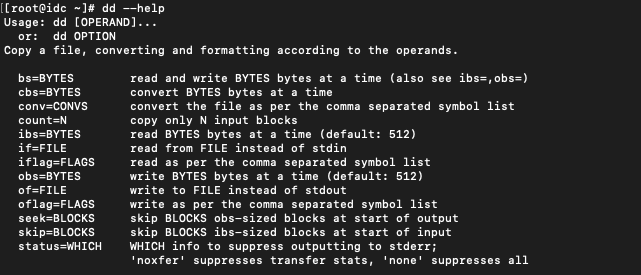
To create the file we need to use dd command as root user .
I am adding 64G of Swap to my server so the count is 67108864 (1024 * 1024 * 64)
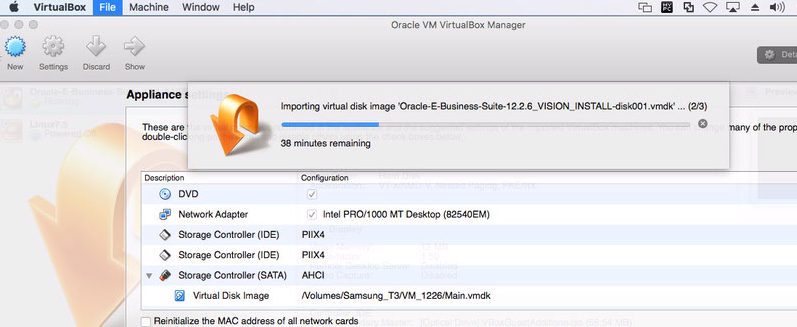
This Post is about How to Create Stage Area To Deploy Oracle VM Virtual Appliance for Oracle E-Business Suite 12.2.6
Step 1:
Download the Oracle E-Business Suite Appliance from Oracle Software Delivery Cloud, Which Contains Below ZIP Files.
V861124-01 Oracle E-Business Suite Release 12.2.6 Single Node Vision Install X86 (64 bit) - (1 of 10) (Part 1 of 2) Linux x86-64V861124-01 Oracle E-Business Suite Release 12.2.6 Single Node Vision Install X86 (64 bit) - (1 of 10) (Part 2 of 2) Linux x86-64V861125-01 Oracle E-Business Suite Release 12.2.6 Single Node Vision Install X86 (64 bit) - (2 of 10) (Part 1 of 2) Linux x86-64V861125-01 Oracle E-Business Suite Release 12.2.6 Single Node Vision Install X86 (64 bit) - (2 of 10) (Part 2 of 2) Linux x86-64V861126-01 Oracle E-Business Suite Release 12.2.6 Single Node Vision Install X86 (64 bit) - (3 of 10) (Part 1 of 2) Linux x86-64V861126-01 Oracle E-Business Suite Release 12.2.6 Single Node Vision Install X86 (64 bit) - (3 of 10) (Part 2 of 2) Linux x86-64V861127-01 Oracle E-Business Suite Release 12.2.6 Single Node Vision Install X86 (64 bit) - (4 of 10) (Part 1 of 2) Linux x86-64V861127-01 Oracle E-Business Suite Release 12.2.6 Single Node Vision Install X86 (64 bit) - (4 of 10) (Part 2 of 2) Linux x86-64V861128-01 Oracle E-Business Suite Release 12.2.6 Single Node Vision Install X86 (64 bit) - (5 of 10) (Part 1 of 2) Linux x86-64V861128-01 Oracle E-Business Suite Release 12.2.6 Single Node Vision Install X86 (64 bit) - (5 of 10) (Part 2 of 2) Linux x86-64V861129-01 Oracle E-Business Suite Release 12.2.6 Single Node Vision Install X86 (64 bit) - (6 of 10) (Part 1 of 2) Linux x86-64V861129-01 Oracle E-Business Suite Release 12.2.6 Single Node Vision Install X86 (64 bit) - (6 of 10) (Part 2 of 2) Linux x86-64V861130-01 Oracle E-Business Suite Release 12.2.6 Single Node Vision Install X86 (64 bit) - (7 of 10) (Part 1 of 2) Linux x86-64V861130-01 Oracle E-Business Suite Release 12.2.6 Single Node Vision Install X86 (64 bit) - (7 of 10) (Part 2 of 2) Linux x86-64V861131-01 Oracle E-Business Suite Release 12.2.6 Single Node Vision Install X86 (64 bit) - (8 of 10) (Part 1 of 2) Linux x86-64V861131-01 Oracle E-Business Suite Release 12.2.6 Single Node Vision Install X86 (64 bit) - (8 of 10) (Part 2 of 2) Linux x86-64V861132-01 Oracle E-Business Suite Release 12.2.6 Single Node Vision Install X86 (64 bit) - (9 of 10) (Part 1 of 2) Linux x86-64V861132-01 Oracle E-Business Suite Release 12.2.6 Single Node Vision Install X86 (64 bit) - (9 of 10) (Part 2 of 2) Linux x86-64V861133-01 Oracle E-Business Suite Release 12.2.6 Single Node Vision Install X86 (64 bit) - (10 of 10) (Part 1 of 1) Linux x86-64
Step 2:
Download assembly.sh (UNIX) or assemble_OSX.sh(for Mac) from Oracle Support Doc ID 2254565.1 Or You can Use UNZIP Tools like 7ZIP.exe. Generate Oracle-E-Business-Suite-12.2.6_VISION_INSTALL.ova.00 to Oracle-E-Business-Suite-12.2.6_VISION_INSTALL.ova.18
Step 3:
UnZip All the OVA part Files to Make it as a Single OVA file. i.e. Oracle-E-Business-Suite-12.2.6_VISION_INSTALL.ova
Semaphores are a shareable resource that take on a non-negative integer value. They are manipulated by the P (wait) and V (signal) functions, which decrement and increment the semaphore, respectively. When a process needs a resource, a “wait” is issued and the semaphore is decremented. When the semaphore contains a value of zero, the resources are not available and the calling process spins or blocks (as appropriate) until resources are available. When a process releases a resource controlled by a semaphore, it increments the semaphore and the waiting processes are notified.”
The system does n`t have actual resource available to serve the request, so either we need to configure the Kernel Semaphores or clear the Old entries to get it back.
kernel.sem = SEMMSL SEMMNS SEMOPM SEMMNI
SEMMSL maximum number of semaphores per array
SEMMNS maximum semaphores system-wide
SEMOPM maximum operations per semop call
SEMMNI maximum arrays
—— Semaphore Limits ——– max number of arrays = 142 max semaphores per array = 256 max semaphores system wide = 32000 max ops per semop call = 100 semaphore max value = 32767
—— Messages: Limits ——– [root@r12 ~]#
[root@r12 ~]# ipcs -ls
—— Semaphore Limits ——–
max number of arrays = 142
max semaphores per array = 256
max semaphores system wide = 32000
max ops per semop call = 100
semaphore max value = 32767
To Clear , we can execute the following
ipcs | grep apache | awk ‘{print $2}’ > sem.txt
for i in `cat sem.txt`; do { ipcrm -s $i; }; done;



























 Not Just Databases